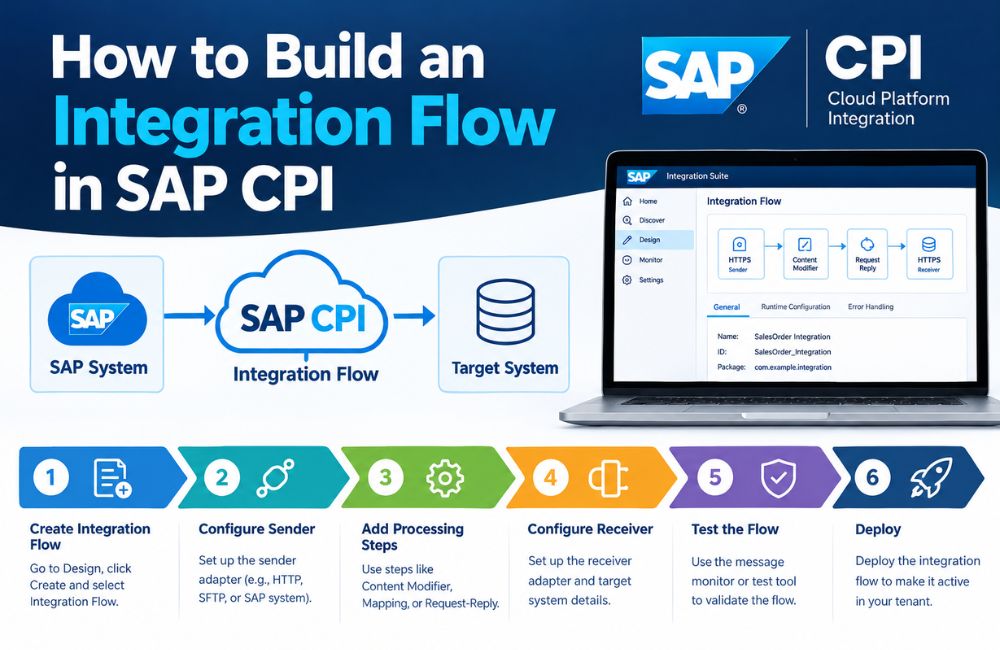
SAP CPI Integration is used to connect SAP applications, third-party platforms, APIs, databases, file servers, and other business systems. SAP CPI is the commonly used name for SAP Cloud Platform Integration. In current SAP terminology, Cloud Integration is a capability within SAP Integration Suite on SAP Business Technology Platform (SAP BTP).
An integration flow, commonly called an iFlow, defines how a message moves from a sender to a receiver. It can control connectivity, message transformation, mapping, routing, validation, and other processing steps. SAP provides a graphical editor where integration developers can model these steps.
For beginners, building an iFlow involves several important stages. You need to understand the source and target systems, select the correct adapters, configure the message-processing steps, test the flow, and deploy it to the Cloud Integration tenant.
This guide explains how to build an integration flow in SAP CPI in a clear, practical, and search-friendly format. It also covers AEO and GEO considerations for technical content.
What Is an Integration Flow in SAP CPI?
An integration flow is a visual model that defines how a message is processed inside SAP Cloud Integration.
An integration flow normally contains a sender, a receiver, communication adapters, and one or more message-processing steps. SAP describes these as the main elements used to define how messages are processed on the tenant.
A basic architecture can look like this:
Sender → Adapter → Integration Process → Processing Steps → Adapter → Receiver
For example:
E-commerce System → HTTPS → SAP CPI → Message Mapping → S/4HANA
The e-commerce system sends the message. SAP Cloud Integration receives it through the configured adapter. The message is then transformed or processed before it reaches SAP S/4HANA.
The exact flow depends on the business requirement and the technologies used by the connected systems.
What You Need Before Building an SAP CPI Integration Flow
Before creating an iFlow, identify the source and target systems.
You should know which application will send the message and which application will receive it. You should also identify the communication protocol, authentication method, message format, required fields, and expected response.
For example, consider an integration between an external application and SAP S/4HANA.
The source might provide JSON through a REST API, while the SAP system may require a different structure. In this situation, the integration flow needs an appropriate sender adapter, message-processing logic, mapping, and receiver configuration.
You also need access to an SAP Cloud Integration environment and an integration package. SAP’s current documentation requires an integration package before creating an integration flow.
Step 1: Create an Integration Package
The first step is to create or select an integration package.
An integration package provides a container for related integration artifacts. These artifacts can include integration flows and other integration resources.
In the SAP Cloud Integration design environment, you can select an integration package and open it for editing. You can then add an integration flow from the Artifacts section. SAP documents this as the standard process for manually creating a new integration flow.
A meaningful package name can help identify the business process or application area.
For example:
Customer Integration
Order Management Integration
S/4HANA CRM Integration
The naming structure should match the organization’s integration governance rules.
Step 2: Create the Integration Flow
After opening the integration package, navigate to the Artifacts tab and select Add Integration Flow.
Choose the option to create a new integration flow.
You can provide a name and description for the flow. SAP automatically generates an ID from the name by default, although the ID can be edited manually. The integration flow ID must be unique across the tenant.
For example:
Name: Customer Order Integration
ID: Customer_Order_Integration
A clear description should explain the purpose of the integration.
For example:
“Transfers customer order data from the external commerce platform to SAP S/4HANA.”
Clear naming makes integration content easier to manage when a tenant contains many flows.
Step 3: Define the Sender System
The sender represents the system that initiates or provides the message.
The sender can be an SAP application, third-party application, API, file server, or another supported system.
SAP Cloud Integration supports different types of remote systems and communication protocols. Examples include on-premise SAP systems, SFTP servers, cloud applications, SOAP clients, and other systems.
For example:
Sender: E-commerce Platform
The sender connection determines how the message reaches the integration flow.
If the external application sends data through HTTPS, an HTTPS-based sender adapter may be appropriate.
Step 4: Configure the Sender Adapter
The adapter defines the technical communication channel between the sender and Cloud Integration.
SAP explains that adapters specify the technical protocols used to connect senders and receivers to the integration platform.
Common integration technologies include:
HTTPS for secure web-based communication.
SOAP for SOAP web services.
SFTP for secure file exchange.
OData for OData-based services.
IDoc for SAP document-based integration.
The appropriate adapter depends on the source system and its interface.
For example, if an application sends an HTTP request to a Cloud Integration endpoint, an HTTPS sender adapter can be configured to receive that request.
Step 5: Add the Integration Process
The Integration Process is the central area where you add message-processing steps.
SAP’s graphical editor allows developers to drag and drop processing components into the integration flow. These steps determine what happens to the message after it enters the platform.
Depending on the scenario, the flow may contain steps such as message mapping, content modification, routing, filtering, request-reply processing, or other supported components.
A simple integration may require only one or two processing steps.
A complex enterprise integration can contain many processing stages.
The design should reflect the actual business and technical requirements.
Step 6: Add Message Mapping When Required
Different applications often use different message structures.
For example, an external system may send:
customerId
customerName
orderAmount
while the SAP target expects:
CustomerNumber
CustomerName
TotalAmount
A Message Mapping step can establish the relationship between source and target fields.
SAP provides a graphical mapping editor. Developers can add source and target message structures and connect the relevant fields. Mapping can also use functions for required transformations.
SAP documentation identifies supported mapping source and target definitions such as XSD, OData metadata, WSDL, and supported OpenAPI specification files.
A simplified mapping can look like:
customerId → CustomerNumber
customerName → CustomerName
orderAmount → TotalAmount
The actual mapping depends on the schemas of the source and target systems.
Step 7: Add Transformation and Content Processing
Message mapping is not the only processing option.
An integration flow may need to modify message content, create properties, change headers, filter information, or prepare a message for another processing step.
For example, a source application may send an order with 20 fields while the target system requires only 8 fields.
The integration flow can process the message and provide only the information required by the target.
Cloud Integration supports different message-processing steps for these types of requirements. SAP describes integration flow steps as the components used to define what happens to a message during processing.
Step 8: Configure Message Routing
Some integration scenarios require conditional routing.
For example, an organization may process orders differently depending on the customer’s country.
The flow could use a routing condition such as:
Country = Germany → European Processing System
Country = USA → North American Processing System
A router can evaluate message information and send the message through the appropriate path.
This becomes useful when a single source system communicates with multiple target systems.
Routing is one of the integration patterns supported by Cloud Integration.
Step 9: Define the Receiver System
The receiver is the system that receives the processed message.
The receiver could be:
SAP S/4HANA
SAP SuccessFactors
A CRM platform
A REST API
An SFTP server
A database
The receiver adapter determines how Cloud Integration communicates with the destination.
For example:
SAP CPI → HTTPS → REST API
or:
SAP CPI → SFTP → File Server
The correct receiver adapter depends on the target interface and protocol.
Step 10: Configure the Receiver Adapter
The receiver adapter contains the technical configuration needed to communicate with the target.
The configuration can include details such as the endpoint address, authentication method, connection settings, and other adapter-specific parameters.
For example, an HTTPS receiver may require an API endpoint and authentication configuration.
An SFTP receiver may require a server address, port, user authentication, and directory information.
Security configuration should be handled using the appropriate Cloud Integration security mechanisms rather than placing sensitive credentials directly into message content.
SAP documents security artifacts such as digital keys and keystores as part of the security configuration for secure communication.
Step 11: Configure Authentication and Security
Security should be considered before the integration flow is deployed.
The authentication method depends on the connected application and adapter.
An API may use credentials, OAuth-based authentication, certificates, or another supported method. An SFTP connection may use SSH-related authentication mechanisms.
HTTPS can protect communication between systems when correctly configured.
SAP explains that communication protocols such as HTTP/S and SSH have security options that can protect message exchange.
Security configuration should also consider authorization, certificate management, credential storage, and organizational security policies.
Step 12: Validate the Integration Flow
Before deployment, review the integration flow configuration.
Check the sender and receiver connections. Confirm that the selected adapters match the required protocols. Review mapping fields and routing conditions.
The message structure should also be checked against the requirements of the target application.
For mapping scenarios, verify that required source fields are connected to the correct target fields.
SAP’s mapping editor provides source and target structures that developers can use to establish field relationships.
Validation at this stage can reduce configuration problems during testing.
Step 13: Test the Integration Flow
Testing confirms whether the flow processes messages as expected.
A test message should represent a realistic business transaction.
For example, if the integration processes sales orders, the test message should contain the required order fields and valid values.
Testing should check the complete process:
Message Received → Processing → Mapping → Routing → Target Delivery
The target application should be checked to confirm that the message was received and processed correctly.
Different test cases can also be used for valid data, missing fields, incorrect values, authentication errors, and unavailable endpoints.
Step 14: Deploy the Integration Flow
An integration flow must be deployed before it can run on the Cloud Integration tenant.
SAP documentation states that integration flows defined during design time need to be deployed to activate them on the associated tenant.
After deployment, the flow becomes available for runtime processing according to its configuration.
Deployment should occur after the flow has been reviewed and tested.
Production deployment should also consider security, monitoring, error handling, and operational requirements.
Step 15: Monitor the Integration Flow
Monitoring helps determine whether messages are processed successfully.
After deployment, integration administrators can use Cloud Integration monitoring capabilities to examine message processing and integration content.
If a message fails, monitoring information can help identify the affected flow and investigate the processing stage.
For example, an error may occur because of:
Invalid authentication
Incorrect mapping
Unavailable target system
Invalid message structure
Missing required data
Monitoring should be part of the integration lifecycle rather than an activity performed only after an error occurs.
SAP CPI Integration Naming Conventions
Clear naming is useful when a tenant contains many integration flows, channels, mappings, and related artifacts.
SAP provides naming conventions for integration resources. For example, channel names can include the protocol, direction, and operation definition. SAP gives examples such as HTTP_RCV_PurchaseOrderCreate.
Mapping names can also describe the source message, target message, and format.
For example:
MM_PurchaseOrderERPXML_to_PurchaseOrderC4CJSON
Clear names make it easier for developers and administrators to understand the purpose of an integration artifact.
SAP CPI Integration Error Handling
A production integration flow should account for expected errors.
For example, a temporary network problem can prevent a message from reaching a receiver. An invalid business record can also cause a target system to reject a message.
These two situations can require different handling.
Error-handling logic can include exception processing, message logging, controlled retry mechanisms, and monitoring.
SAP’s enterprise integration design guidance emphasizes resilience, resource management, loose coupling, and graceful failure handling when designing integration flows.
The appropriate error-handling strategy depends on the business process and technical architecture.
SAP CPI Integration Example
Consider a simple order integration between an online store and SAP S/4HANA.
The online store sends an order through an HTTPS request.
The integration flow receives the order using an HTTPS sender adapter.
The message is then processed. If the external application uses a different structure from S/4HANA, a Message Mapping step transforms the data.
A routing step can determine whether additional processing is required.
The final message is then sent to SAP S/4HANA through the configured receiver connection.
The complete architecture can be represented as:
Online Store → HTTPS Sender → SAP CPI → Message Mapping → Router → S/4HANA Receiver
This is a simplified example. A real implementation may include authentication, validation, error handling, logging, enrichment, and additional processing.
SAP CPI Integration and AEO
Answer Engine Optimization (AEO) focuses on making content easy for search engines and answer systems to understand and use when responding to questions.
For this topic, important questions include:
How do you create an integration flow in SAP CPI?
What is an iFlow in SAP CPI?
How do you configure a sender adapter?
How do you add message mapping?
How do you deploy an SAP CPI integration flow?
Each question should have a direct answer before the detailed explanation.
Clear H2 headings, concise definitions, logical steps, and technically accurate terminology can make the content easier for answer engines to process.
For example, the direct answer to “What is an iFlow?” should appear at the beginning of the relevant section.
SAP CPI Integration and GEO
Generative Engine Optimization (GEO) focuses on creating content that can be accurately interpreted by AI-powered search and generative systems.
For SAP technical content, GEO can be supported by using clear relationships between important entities.
Relevant entities for this topic include SAP Cloud Integration, SAP Integration Suite, SAP Business Technology Platform, integration flow, iFlow, SAP S/4HANA, adapters, Message Mapping, REST API, HTTPS, SOAP, OData, SFTP, and IDoc.
The relationships between these entities should be explained clearly.
For example:
SAP BTP → SAP Integration Suite → Cloud Integration → Integration Flow → Sender → Processing → Receiver
Using the current SAP product terminology is also important. “SAP CPI” remains a widely searched term, while current SAP documentation refers to Cloud Integration within SAP Integration Suite.
This approach provides context for both users who search using the familiar SAP CPI term and readers who use SAP’s current terminology.
SAP CPI Integration Best Practices
Integration flow design should begin with a clear understanding of the business process.
The source and target systems should be identified before development. The required data fields, communication protocol, authentication method, message format, and expected processing behavior should also be defined.
Keep the integration flow understandable. Processing steps should have clear purposes.
Use meaningful names for flows, channels, mappings, and other artifacts. SAP provides naming guidance for these resources.
Security credentials should be managed through appropriate security mechanisms.
Testing should include valid and invalid messages. Error handling and monitoring should be considered before production deployment.
Frequently Asked Questions About Building an SAP CPI Integration Flow
What is an integration flow in SAP CPI?
An integration flow is a graphical model that defines how a message is received, processed, transformed, routed, and delivered to a receiver. SAP Cloud Integration provides a graphical editor for designing these flows.
How do I create an SAP CPI integration flow?
First, create or open an integration package. Then add an integration flow, provide its name and ID, define the sender and receiver, configure adapters, add processing steps, test the flow, and deploy it. SAP documents these steps in its Cloud Integration development guide.
What is an iFlow?
An iFlow is a commonly used term for an integration flow. It defines the sequence of processing actions used to handle messages between connected systems.
What is an adapter in SAP CPI?
An adapter provides the technical communication channel between Cloud Integration and a sender or receiver. The adapter determines the protocol and connection method used for the integration.
Why is Message Mapping used in SAP CPI?
Message Mapping is used to associate fields between source and target message structures. It can also use mapping functions to perform required transformations.
Can SAP CPI connect SAP S/4HANA with third-party systems?
Yes. Cloud Integration supports connections between SAP and non-SAP applications. The specific connection depends on the application, adapter, protocol, authentication method, and integration requirements.
Does an integration flow need to be deployed?
Yes. An integration flow created during design time must be deployed to the associated tenant before it becomes active for runtime processing.
How do I monitor an SAP CPI integration flow?
After deployment, Cloud Integration monitoring capabilities can be used to examine integration content and message processing. Monitoring information can help identify processing failures and configuration problems.
Can SAP CPI transform XML and JSON?
Cloud Integration provides message-processing and mapping capabilities for different message structures and formats. The exact transformation method depends on the source and target message definitions.
Conclusion
Building an SAP CPI Integration flow involves designing a controlled path for messages between a sender and receiver.
The main stages include creating an integration package, creating an iFlow, defining sender and receiver systems, configuring adapters, adding processing steps, mapping data when required, configuring security, testing the flow, deploying it, and monitoring runtime processing.
An integration flow can be simple or complex depending on the business process. A basic flow may connect one sender directly to one receiver. More advanced flows can include multiple receivers, mappings, routing conditions, APIs, transformations, error handling, and additional processing.
SAP CPI Integration is currently associated with Cloud Integration, a capability within SAP Integration Suite on SAP Business Technology Platform. SAP provides official development guidance for integration flows, adapters, mapping, deployment, monitoring, and integration design.